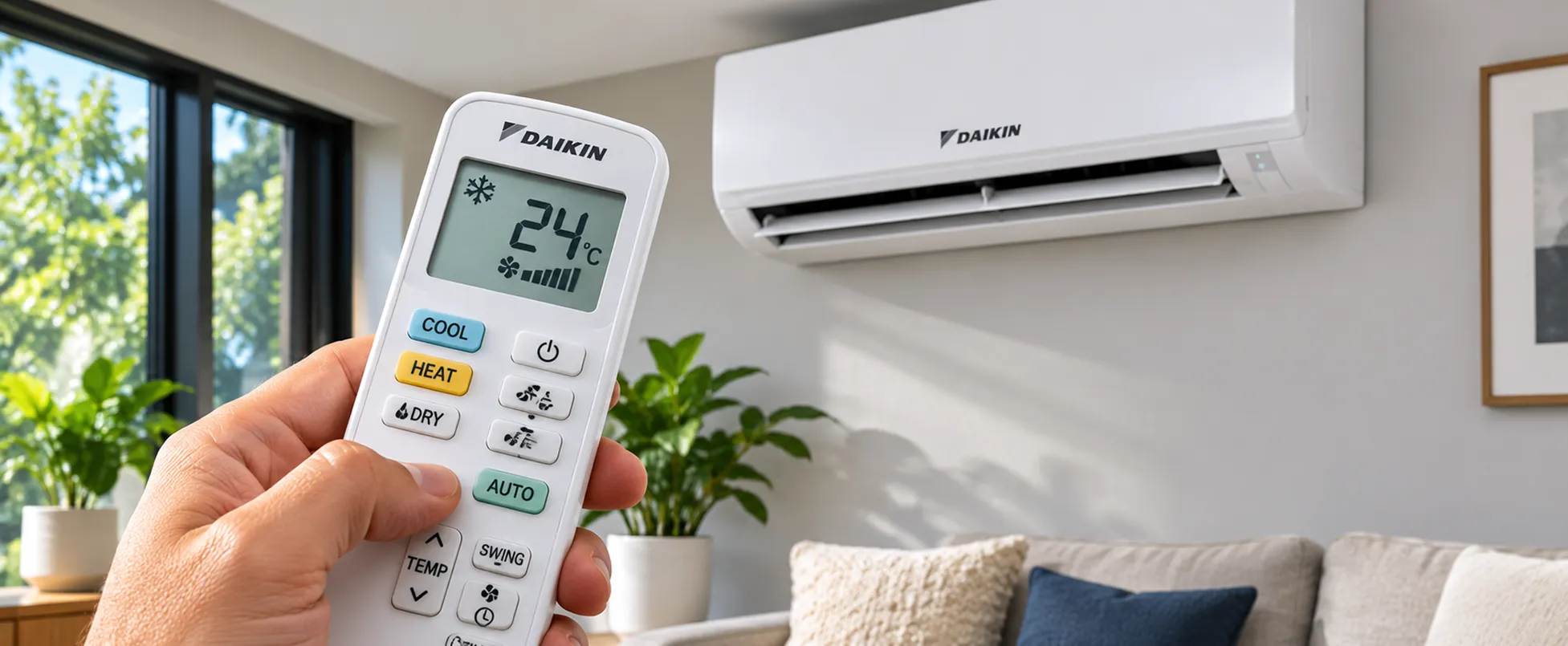
Understanding Daikin Remote Control Symbols
Snowflake Symbol – Cool Mode
When should you use it?
- During hot summer afternoons.
- When indoor temperatures feel uncomfortable.
- When you want to maintain a steady room temperature.
Sun Symbol – Heat Mode
☀️ What it means: The sun symbol represents Heat Mode.
Daikin reverse cycle air conditioners can warm indoor spaces by transferring heat from outside air into your home. This setting is useful during cold mornings and winter evenings.
When should you use it?
- During cold winter days.
- When indoor temperatures drop at night.
- When you need consistent heating in your living space.
Practical tip: Set a comfortable temperature instead of choosing the highest setting. Allow the system some time to warm the room.
Note: Heat Mode is available only on compatible heating and cooling models.
Water Drop Symbol – Dry Mode
💧 What it means: The water drop symbol represents Dry Mode.
Dry Mode helps remove excess moisture from indoor air. It is particularly useful when the weather feels humid or sticky, even when the room is not especially hot.
When should you use it?
- During humid or rainy weather.
- When the room feels damp or sticky.
- When you want to reduce excess moisture indoors.
Practical tip: Use Dry Mode when humidity is the main problem. It may also cool the room slightly, depending on your model and operating conditions.
Fan Symbol – Fan Mode
🌀 What it means: The fan symbol represents Fan Only Mode.
- When the room already feels comfortable.
- When you want air circulation without active cooling.
- When you need gentle airflow.
Practical tip: Fan Mode does not work like Cool Mode. It moves existing indoor air rather than actively lowering its temperature.
AUTO Symbol – Automatic Mode
When should you use it?
- When indoor temperatures change throughout the day.
- When you prefer automatic operation.
- When you do not want to change the mode manually.
Practical tip: If you prefer direct control over cooling or heating, select the required mode instead of AUTO.
Other Important Daikin Remote Control Symbols
Apart from the main operating modes, your remote may display several other icons. These help you control airflow, adjust comfort settings, and manage daily operation.
Fan Speed Symbol
- Auto: The system adjusts fan speed automatically.
- Low: Produces gentle airflow.
- Medium: Provides moderate air circulation.
- High: Moves more air around the room.
- Quiet: Reduces indoor fan noise on compatible models.
When should you use it?
Swing Symbol – Airflow Direction
- Vertical Swing: Moves the airflow up and down.
- Horizontal Swing: Moves the airflow from side to side.
- 3D Airflow: Combines both directions on compatible models.
When should you use it?
Powerful Mode Symbol
When should you use it?
- When entering a room that feels particularly hot.
- When you need faster cooling or heating.
- When the room temperature is far from your preferred setting.
Econo Symbol – Energy Saving Mode
When should you use it?
- When you want to reduce electricity usage.
- When the room has fewer occupants.
- When you do not need maximum cooling or heating output.
Sleep Symbol – Sleep Mode
When should you use it?
Clock and Timer Symbols
- ON Timer: Starts the air conditioner at a selected time.
- OFF Timer: Stops the air conditioner at a selected time.
- Weekly Timer: Allows you to set different operating schedules for different days on compatible models.
Lock Symbol – Child Lock
When should you use it?
Defrost and Hot Start Symbols
- Defrost: The outdoor unit temporarily removes frost that builds up on its heat exchanger in cold conditions.
- Hot Start: Helps prevent an uncomfortable flow of cold air when heating begins.
If you notice a temporary pause in heating during a defrost cycle, it does not automatically mean the system has a fault. Allow the operation to complete.
How to Choose the Right Daikin Remote Setting
Choosing the correct setting depends on the weather, indoor temperature, and your comfort needs.
| Situation | Recommended setting |
|---|---|
| Room feels too hot | Cool Mode |
| Room feels too cold | Heat Mode |
| Air feels damp or humid | Dry Mode |
| Room temperature is comfortable | Fan Mode |
| You prefer automatic operation | Auto Mode |
| You need stronger airflow | High Fan Speed |
| You want air distributed across the room | Swing Mode |
| You want to limit power consumption | Econo Mode |
| You need scheduled operation | Timer Mode |
Why Are Some Symbols Missing on Your Daikin Remote?
If you press a button and see a message such as “This function is not available”, your indoor unit may not support that feature. It does not necessarily mean the remote is damaged.
Conclusion
Understanding Daikin remote control symbols makes it easier to choose the right settings for different weather conditions and comfort needs. Whether you use Cool Mode during summer, Dry Mode during humid weather or Sleep Mode at night, each function has a specific purpose. Take a moment to learn the symbols on your remote and use the settings that suit your space. If your air conditioner displays an unfamiliar warning, does not respond to commands, or struggles to maintain the desired temperature, it may need professional attention.
Need help with your Daikin air conditioner? Contact Airfreeze for professional Daikin installation, repairs and maintenance across Tamworth and surrounding areas. Our experienced team is ready to help.